Web hosting
1984 Hosting for WordPress in Iceland: pricing and backups
1984 Hosting’s WordPress plans in Iceland, initial and renewal terms, migration, the Security Pack and backup limitations.
Read more →

Site appearance
Web hosting
A Plesk WordPress offer in Sydney, comparing two small plans and distinguishing restoration and migration terms from cPanel services.
Source published: · Source updated: · Editorial policy
Visit the official Digital Pacific website ↗
This profile is based on published offers and documentation. No new hosting benchmark or support test was performed for this translation.
Prices retain the market, currency and billing period described in the French source. Translation does not update a commercial quote. Confirm the final price, taxes and options before ordering.
| Plan | Price and billing | Resources and limits |
|---|---|---|
| WordPress Hosting Basic — monthly | 22.55 AUD billed each month; separate prepaid year: 227.27 AUD, recorded on November 3, 2026. Renewal: Recurring service at the applicable rate; no separate promotional and renewal prices identified. 22.55 AUD for the following month only if pricing remains unchanged. Australian dollars; month paid in advance, or year paid in advance if selected; personalized tax treatment not established. | 1 site according to the public page, 10 GB, 1 GB shared RAM, 200% shared CPU, 2 databases, Plesk panel. Shared resources; two databases to divide between production and copy; included email not established. |
| WordPress Hosting Standard — monthly | 33.88 AUD billed each month; separate prepaid year: 341.47 AUD, recorded on November 3, 2026. Renewal: No second renewal schedule identified. Renewal follows the contract and applicable rate, without a future-price guarantee. Advance payment according to cycle; 406.56 AUD for twelve monthly payments at unchanged pricing, separate from the annual cycle. | 1 site according to the public page, 25 GB, 2 GB shared RAM, 200% shared CPU, 2 databases, Plesk panel. Storage and RAM increase, but database quota and advertised CPU share do not; assess assisted restoration and migration. |
Digital Pacific presents a WordPress range under Plesk, the panel used to administer hosting. Its advertised location is Sydney. This matters to a business whose readers, customers or contributors are mainly in Australia. A French billing address does not change that location: choosing this service places the site far from part of its European audience.
Location alone does not predict loading time. Image weight, plugins, queries and caching influence results. A lightweight brochure site and a store with complex search place different demands on a shared plan. Official pages were checked on November 3, 2026. No load test or uptime measurement was performed for this documentary profile.
The starting question is practical: is a small Australian WordPress site manageable under Plesk with English-speaking support needed? If French-language assistance or infrastructure near French visitors is the priority, this range addresses the project less directly. A Sydney location also does not prove every subprocessor, external copy or connected service keeps all data in that city.
The public account-creation form offers France in its country selector. This is a useful indication of openness to foreign addresses, more specific than general international marketing. The form was not completed: no account, payment or identity check was performed. Final acceptance of a French customer for the chosen product therefore remains a sign-up step, not a verified result here.
Before paying, prepare genuine billing details, the payment method’s country and the currency in which the bank will debit the account. Australian-dollar pricing may involve conversion and bank fees. These fees are neither a host discount nor an option and vary with the customer’s payment provider.
Eligibility to register an Australian domain is separate. The provider describes criteria specific to Australian extensions; France appearing in the hosting form does not waive them. Hosting can be considered without immediately transferring the domain. Initially keeping it with the usual provider also eases gradual migration and avoids combining two changes in one intervention.
The first two plans differ in more than storage. Basic displays 10 GB and 1 GB shared RAM; Standard increases to 25 GB and 2 GB. Advertised CPU allocation stays at 200%, and each includes two databases. This commercial percentage does not mean two physical processors exclusively reserved for the customer. It describes a shared-platform limit.
The public page assigns one site to each plan. The billing catalogue also uses Addon Domains: 1; that line is insufficient to conclude there are two production WordPress sites. For project sizing, retain the explicit one-site quota and clarify any multidomain arrangement before purchase. A preparation copy also needs resources even when it is not a second commercial site.
Basic merits examination for a project with modest files and database. Standard gives more media and memory headroom but doubles neither database count nor displayed CPU ceiling. Measuring current usage at the old host, adding necessary temporary copies and identifying costly tasks makes a sounder choice than audience-tool visitor counts alone.
The public billing catalogue lists 22.55 AUD per month for Basic and 33.88 AUD for Standard. At unchanged prices, twelve monthly payments total 270.60 AUD and 406.56 AUD respectively. These calculations describe twelve monthly payments, not a prepaid annual commitment. They mainly compare cash-flow flexibility with a period paid in advance.
The sales page separately displays 227.27 AUD for a Basic year and 341.47 AUD for a Standard year. Its rounded monthly equivalents are 18.94 AUD and 28.46 AUD. For annual budgeting, use displayed totals instead of multiplying rounded equivalents by twelve, which would produce a difference of a few cents. The difference between monthly payments and a year reflects the chosen cycle here, without proving a permanent discount.
For an initial site move, monthly payment limits money tied up while learning the service. A prepaid year may be justified once operation, taxation and associated services are confirmed. In either case, keep the offer summary, exact period and amount due; a “from” slogan does not replace those three facts.
No clear “promotional price then renewal price” pair was identified for the Basic and Standard monthly rates examined. The terms provide for recurring advance billing. The following month therefore follows the applicable schedule and contract, with no guarantee today’s observed price stays unchanged for years. Presenting 22.55 AUD as a lifetime-locked renewal rate would be unjustified.
Australian GST treatment for a French account was not established in the checked pages. Amounts are retained in AUD without automatically labeling them tax-exclusive or tax-inclusive. Examine the invoice corresponding to the customer’s country and profile. Mechanically adding a percentage or applying a fixed euro conversion would create misleading precision.
The complete budget also depends on selected services: domain, email, migration, assisted restoration and possible third-party services. To compare hosts, list functions actually used and request their costs over the same cycle. Separating a one-off moving expense from recurring costs helps explain the second month or year after the hosting change’s effects have passed.
Official help describes entry through the customer area: open Active Services, choose the service’s gear icon, then View Details and Login to Plesk. This identifies the correct environment without following a cPanel tutorial for another range. Billing portal, Plesk panel and WordPress administration are separate spaces; their access and responsibilities may differ.
The public pages and procedures consulted are in English. Translating some interfaces does not prove complete French-language support, especially for billing or incidents. WordPress itself can display administration in French; that does not translate exchanges with the host. A team uncomfortable in English must plan who describes an outage and understands received instructions.
Technical support is advertised as continuously available. The currently displayed sales telephone window is Monday to Friday from 7 to 23 in Sydney. These statements do not promise every channel around the clock. For a ticket, provide the affected service, local time and timezone, exact error and recent changes without including a password. Actual resolution time was not tested.
Plesk and its WordPress management tool bring installation, plugin and theme operations together. Their value is locating sites from the hosting panel and organizing maintenance. They do not turn plugin choices into decisions made by the host or guarantee every update will work with the customer’s theme or code.
When getting started, identify production in the WordPress menu and verify its address. For a major change, have a recoverable copy, prepare a working version and define post-intervention checks. For a brochure site, check pages, form and media. For a store, also examine cart and ordering in a suitable test environment.
The documentation and public site contain older technical references. These do not guarantee a precise PHP version is still offered at ordering time. A project depending on a particular version or module must obtain the actually available list. Infrastructure administration and application-code maintenance remain separate scopes: explicitly ask who handles plugin incompatibility before making that a selection criterion.
The checked pages do not establish an AI site generator, writing assistant or image credits in Basic or Standard. Plesk’s presence does not prove every feature offered elsewhere by the panel publisher is enabled and included in this contract. A separately sold site-creation service is likewise not an included hosting feature.
This lack of evidence should guide the budget: choose these plans for documented resources and operational tools, then separately examine any AI service. If adding a WordPress writing plugin, its license, usage limits, data handling and dependence on an external account belong to that plugin. Do not attribute them to the Digital Pacific plan.
To check a future assistant proposal, request its exact name, panel location, included uses and charges after quota exhaustion. A demonstration should show editable, exportable content. Its value for a business site also depends on review: fast generation verifies neither described services, contact details nor published commercial terms.
The plans advertise daily backups. The Plesk WordPress procedure documents R1Soft and recovery points reaching back up to thirty days. That maximum does not promise a point for every day of every incident. At contract start, checking actually offered dates and covered data is more useful than a backup icon alone.
The public page also states 40 dollars per restoration in its service explanation, while a customer-operated procedure is published. Distinguish charged intervention from what customers can perform themselves on the subscribed plan. This profile therefore treats neither every restoration as free nor every panel click as automatically billed 40 AUD.
An independent copy remains useful, especially before migration or a major update. It must combine necessary files and database export with a date and destination outside the hosting account. Checking it means verifying readability and knowing how to reuse it on a preparation installation. A file on the same disk as the site does not protect against every account failure.
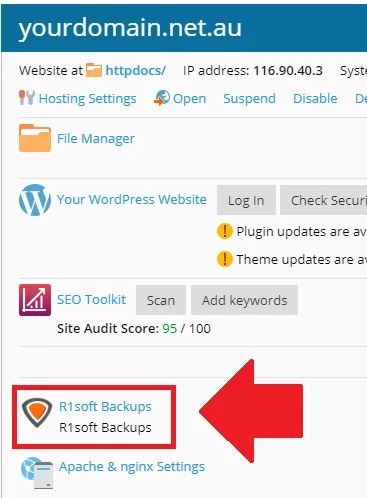 Illustrative screenshot from the developer’s documentation. The displayed SEO score belongs to the example and does not result from a test by us.Open full-size screenshot ↗
The documented R1Soft recovery makes the site unavailable during the operation. Choosing a maintenance period and suspending edits avoids new data during rollback. Restoration does not merge sales, publications or registrations received since the selected point.
The official procedure includes separating old files, detaching the installation in the WordPress tool and finally detecting it with Scan. Files and database are recovered separately at the same point through Browse Files and Browse Databases. Performing only half this workflow can leave an inconsistent site. For beginners, having someone familiar with Plesk prepare the intervention is preferable to exploratory clicking.
Preparation can start without restoring: identifying the database and checking archives does not change production. Download current exports to private external storage; do not leave an archive containing credentials in a public web directory.
Staging is a copy for checking a change before launch. The catalogue advertises one-click staging; help also provides a manual Plesk method: create a subdomain, copy files, create an empty database and user, change the connection in wp-config.php, then import data and adapt addresses. Check availability of the advertised shortcut in the delivered panel. The manual guide labels the operation advanced, allows at least an hour and states that support does not fix CMS development problems. “Staging” therefore does not imply included human service.
The decisive point is database independence. Copying files while retaining production credentials risks changing the real site from the copy. Basic and Standard display only two databases: production and staging may consume the entire quota. Duplicated files also occupy plan storage; allow space before filling Basic’s 10 GB.
Before the copy’s first load, prepare protection and connection to the separate database; do not expose files still using production credentials. Disable payments, automatic email and external connections before trials and limit indexing. An indexing setting alone does not protect personal data. Once the change is validated, define what will be deployed. Replacing the entire production database with an old copy would remove orders received since creation. Rollback means removing the targeted change or recovering the prepared state without blindly affecting new data.
The public migration service starts at 99 AUD per account for cPanel-to-cPanel transfers and 149 AUD for non-cPanel-to-cPanel transfers. The first-price explanation states GST is included; it does not establish tax treatment for a French customer’s WordPress subscription. Active hosting is required. Both prices describe a cPanel destination, not an automatic quote for the Plesk WordPress range studied here. Clarify the exact route, data moved and price applicable to this destination.
To prepare manual or outsourced migration, inventory files, database, domain, DNS and email separately. First copy the site to new hosting and check operation before changing the domain’s public destination. The expected result is an installation displaying correct pages and using its own database while leaving the old one available during checks.
A store also needs a plan for data arriving between initial copying and final switchover. A short organized pause may be preferable to two sites simultaneously recording different orders. Keeping the old account until verification allows rollback if a defect appears. Pair this precaution with a cancellation date so the safety period does not become a forgotten double subscription.
The WordPress page links to an email service and does not clearly establish a mailbox count included in Basic or Standard. Clarify inclusion before adding addresses to the budget. WordPress being able to send notifications does not necessarily include a business mailbox, archiving or migration of old messages.
When changing hosting, retain email-service DNS records as long as that service remains unchanged. Switching the site does not require automatically moving mailboxes. Afterwards, test a form with a controlled address and look for receipt; a WordPress success message alone does not prove the recipient received the email.
The range advertises a free Let’s Encrypt certificate and infrastructure protection. After activation, check HTTPS and resources still requested over HTTP. A certificate does not assess code or password quality. Individual accounts, limiting unused plugins and checking updates remain useful responsibilities. Advertised malware detection does not establish unlimited cleanup of every compromise.
Plesk documentation describes SQL export through Databases then Export Dump, with destination choice and download option. To prepare departure, export the correct database, retrieve site files and keep the information needed to associate them. Checking the archive on a copy before closing the account reveals missing files while originals remain accessible. SQL export alone contains neither images nor plugins.
Cancellation uses the Members Portal form. The terms mention acting two business days before renewal in imprecise wording: request cancellation at least two business days early and obtain its effective date instead of waiting until the last day. They provide for no cancellation fee but not systematic refunds of prepaid periods. Data is deleted upon cancellation and later recovery is not guaranteed: finish exports before the effective date. Stopping a payment without recording cancellation does not replace this process.
The advertised thirty-day shared-hosting guarantee has conditions and exclusions, particularly additional and setup fees. A refund must be requested; it is not automatic after cancellation. Before annual payment, confirm eligible amounts for the selected WordPress product. The final criterion is the ability to operate and recover the site under planned conditions with an understood full cost, rather than a general satisfaction promise.
Use these references to check the features, requirements and limitations described. Reading documentation is not a practical test.
English translation of the reviewed French edition. Code examples retain their original identifiers, comments and output strings for reproducibility. Linked exercise files and original screenshots may contain French. No new practical tests or price checks are implied by translation.
1984 Hosting’s WordPress plans in Iceland, initial and renewal terms, migration, the Security Pack and backup limitations.
Read more →Compare 34SP.com WordPress containers, shared memory, staging copies, downloadable snapshots and site migration.
Read more →Compare AEserver’s managed WordPress prices and check whether your network must be split into independent installations before migration.
Read more →